
Hfengyun is an official AWS service tier partner focused on providing customers with discounted AWS billing and a range of technical support.

©2024, hfengyun. AWS Discounted Billing | AWS Partner Network
This tip will focus on Azure SQL DB only, excluding on-premise SQL Server, Azure SQL Managed Instance, and Azure Synapse Analytics.

We’re considering creating a new data warehouse. It’s not that enormous—a few gigabytes, not terabytes—and we intend to construct it in the cloud. We are wondering whether to use Azure SQL Database or Snowflake Cloud Data Warehouse. Do you have any suggestions? Which is more affordable?
Snowflake is a data warehouse vendor whose database solution is a cloud data warehouse offering accessible on Azure, AWS, and Google Cloud Platform. This tutorial will teach you more about Snowflake, and the tip ‘Why Snowflake’ will explain some of the platform’s benefits. You can also read Tip Snowflake vs SQL Server, which compares Snowflake to an on-premises SQL Server installation (or SQL Server in an Azure virtual server).
This tip will focus on Azure SQL DB only, excluding on-premise SQL Server, Azure SQL Managed Instance, and Azure Synapse Analytics.
The size of the data warehouse is the major factor in deciding whether to utilize Snowflake or an Azure SQL DB instance. At its core, Azure SQL DB is an OLTP database that is not intended to manage large amounts of data with analytic queries. Storage capacity for Azure SQL DB’s General and Business Critical tiers is limited to 4 TB. If you require extra storage, you can choose the Hyperscale Services tier, which can hold up to 100 TB of data. However, storage is not inexpensive: in my region, it costs $0.119 per GB per month. This equals $119 per TB every month. Snowflake rates range from $25 to $40 per TB per month (depending on whether you use pre-allocated or on-demand storage), whereas Azure Synapse Analytics storage is roughly $23 per TB per month. Snowflake appears to be a better fit for very big data warehouses because it can scale to petabytes and has far cheaper storage costs. If you wish to continue on the Microsoft Data Platform, Azure Synapse Analytics is a better option than Azure SQL DB for managing big amounts of data.
Snowflake appears to be a better fit for very big data warehouses because it can scale to petabytes and has far cheaper storage costs. If you wish to continue on the Microsoft Data Platform, Azure Synapse Analytics is a better option than Azure SQL DB for managing big amounts of data.
If you load a dataset into both Snowflake and Azure SQL DB, say a few million rows, and then run a lot of queries, Snowflake may outperform Azure SQL DB. Snowflake is designed to handle massive analytic queries, but Azure SQL DB isn’t. Azure SQL database is primarily designed to execute OLTP workloads.
Azure SQL Database’s primary purpose is to execute OLTP workloads. One significant performance consequence is that Azure SQL DB always operates in full recovery mode for point-in-time recovery. This cannot be set to batch recording or easy recovery mode. In other words, all DML queries (INSERT, UPDATE, DELETE, and MERGE) are thoroughly documented.
As a result, the performance of IO operations will be reduced. When transferring on-premise SQL Server databases to Azure SQL DB, query execution times may be lowered. You can’t fine-tune Azure SQL DB like you can with a physical container.
Azure SQL DB performance can be significantly enhanced with correct indexing and data design, including the use of column store indexes. Keep in mind that all Azure SQL DB levels (S3 and higher) do not provide these functionalities. But eventually, you will run into some limitations and the only option is to scale to higher tiers
Snowflake is speedier out of the box but with fewer tuning possibilities. Indexes cannot be created, thus if a query is slow, you must either modify it (for example, by dumping the data in a temporary table) or increase the computational capacity.
Both databases can scale resources up and down. In Azure SQL DB, this is determined by the purchasing model. The vCore-based buying model allows you to expand the number of vCores, memory, storage capacity, and performance. The DTU-based pricing model allows you to scale solely DTUs, which are a combination of computation, memory, and IO resources. Microsoft describes the scalability of these two purchasing approaches as dynamic scalability.
This implies you can manually scale the service. This can be done through the portal, but it may take some time and result in little downtime. When scaling, you can choose amongst purchasing modes:
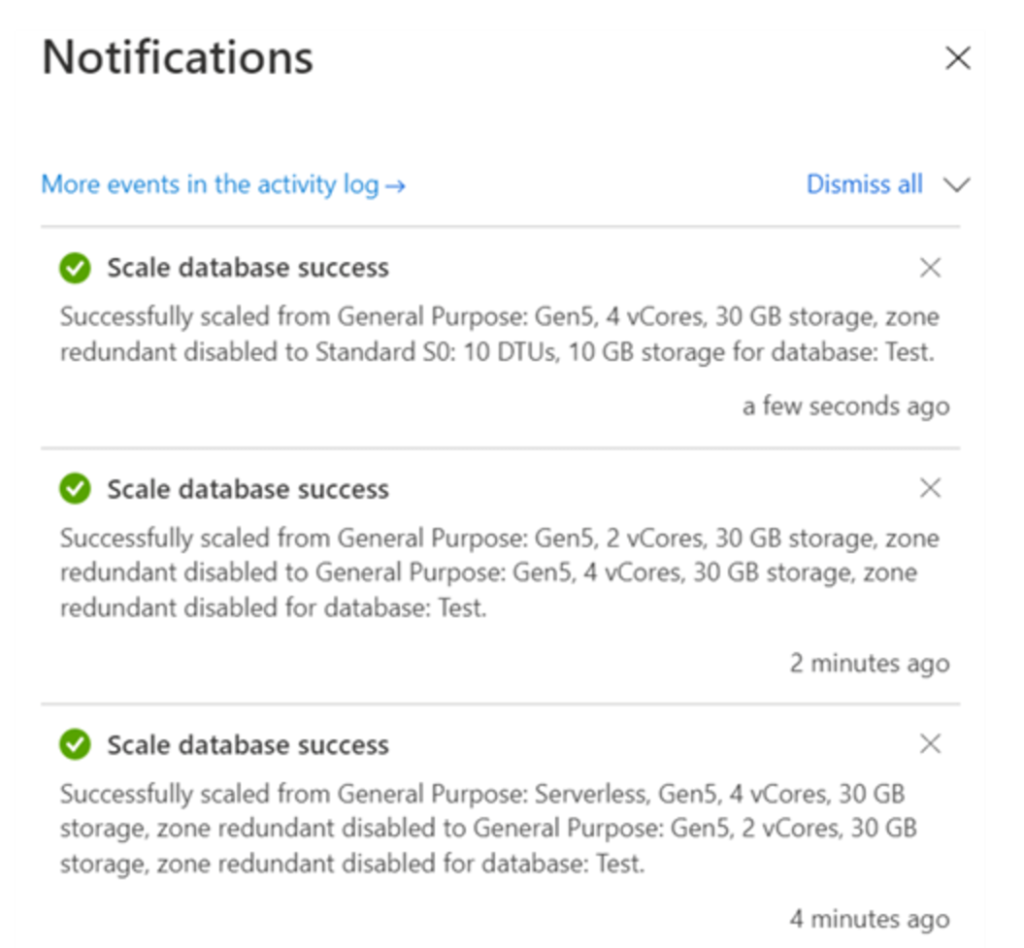
Both the DTU and vCore-based buy modes rely on pre-allocated (configured) resources. When using vCores, you may optionally use the serverless option for the computing tier.
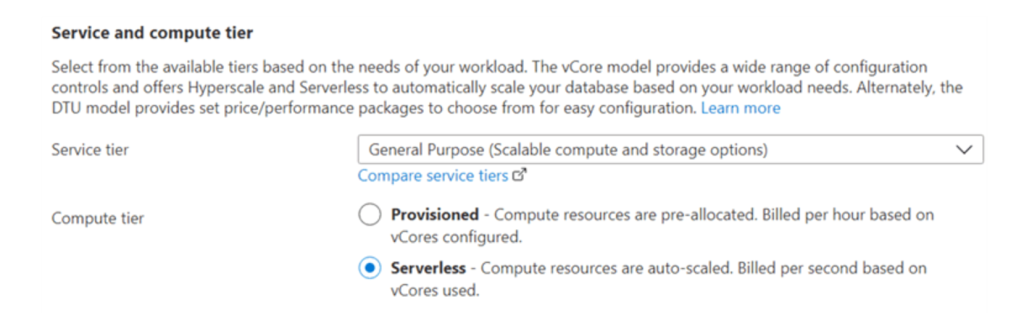
The benefits of having no servers instead of using servers are
Scaling of services occurs automatically. The database engine adjusts the amount of vCores according to the workload. You can choose the maximum and minimum numbers:
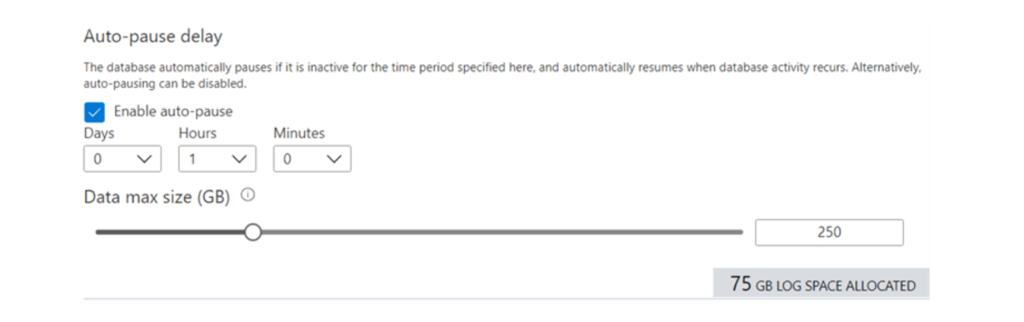
You can use scripts to scale the Azure SQL database. You can use the ALTER DATABASE command, as shown in the tip “Automatically Scaling the Azure SQL DB with Azure Logic Apps”. Alternatively, utilize PowerShell, as demonstrated in this blog post: How to Automatically Scale an Azure SQL Database.
Snowflake can scale its virtual repository up and down. Scaling is transparent and almost instantaneous (unlike Azure SQL DB, which can take a minute or longer)
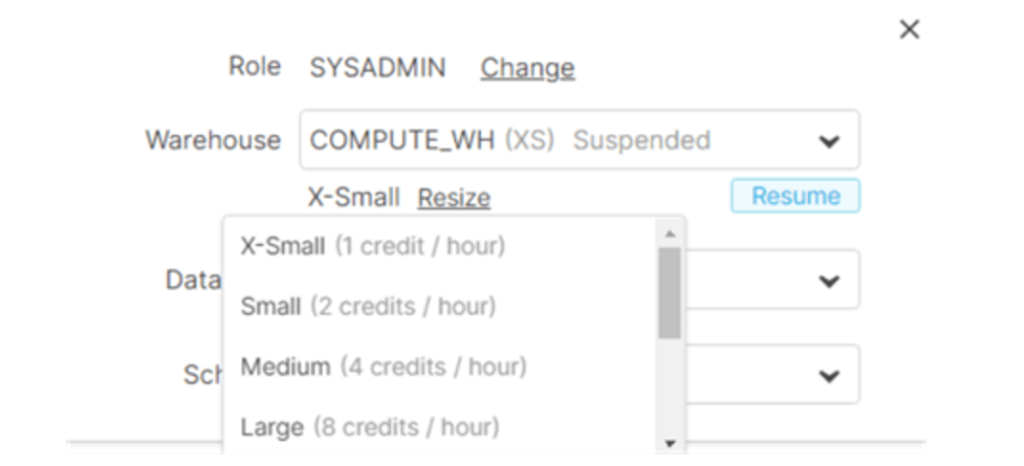
Snowflake repositories can be scaled up and down, as well as grouped into multi-cluster repositories. In this instance, you must scale for concurrency. You may set up auto-scaling for multi-cluster repositories. For example, if your cluster of three repositories experiences an increase in load, Snowflake may extend the cluster to four repositories to manage the additional pressure. However, Snowflake cannot automatically scale the size of individual warehouses. You can scale a repository through the user interface or with the ALTER WAREHOUSE command.
Data repositories can be automatically paused and resumed. This is transparent and immediate, just like scaling up and down. Unlike the Azure SQL database, Snowflake does not lose connections when the warehouse has to resume.
Monthly fees can be calculated simply in both cases:
Snowflake charges a cost per TB. The pricing varies depending on whether you select pre-assigned storage (cheaper) or quickly allocated storage (more expensive). In dollars, costs range from $23 to $40. You will also have to pay for the period the storage is active. You pay the entire price during the first minute, then for each second the repository is active.
The pricing is calculated based on the Snowflake version you’re using. Other services also have fees. Refer to the pricing guide for further information.
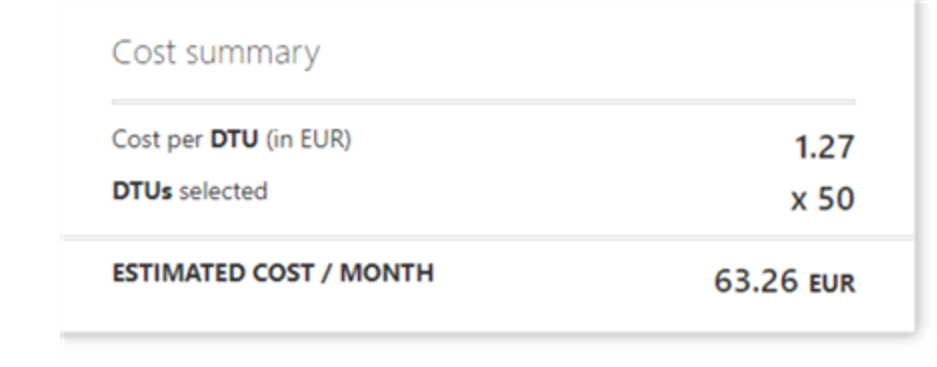
Azure SQL DB costs are largely fixed (unless when utilizing serverless). You pay for the tier in which the database is stored. The more the DTU or vCores, the more you’ll pay per month.
An example of DTUs:
For vcores:
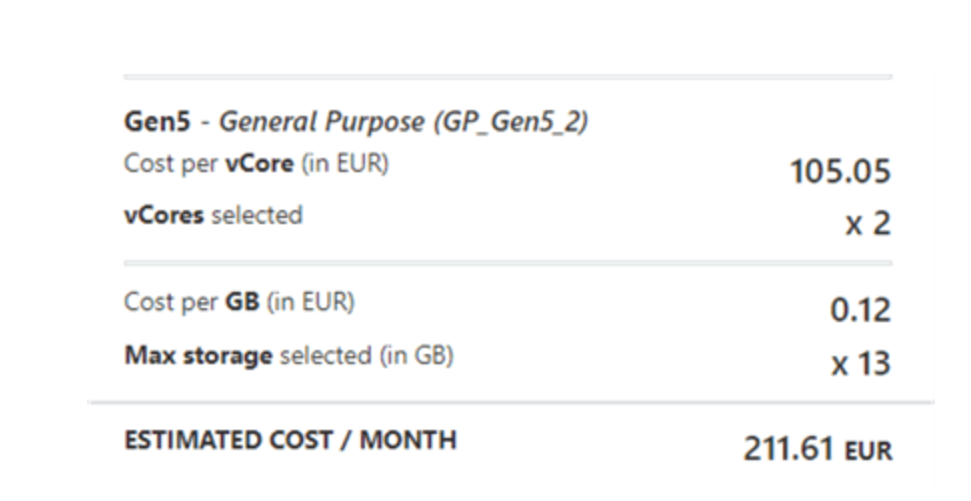
The least amount of vCores is two, resulting in a much greater cost than Azure SQL DB’s standard tier. The expense of storage, on the other hand, is much different. Azure SQL DB is a more expensive data storage option than Snowflake. If you prefer the Azure Data Platform, Azure Data Lake storage may be a better option for very large volumes of data.
Snowflake has a lot going for itself. It has excellent out-of-the-box performance, can handle unstructured data, has a low storage cost, and can scale up and down instantly. However, if the database is accessed frequently, computational expenses can skyrocket. There are techniques to save money, such as pausing virtual warehouses when not in use, combining virtual warehouses to ensure that they are not underutilized, and pulling data into Power BI datasets instead of querying the actual data warehouse.
The Microsoft Azure SQL DB, unlike Snowflake, is unable to manage big data volumes and suffers from performance concerns caused by logging bottlenecks. However, for smaller data sets, Azure SQL DB remains a viable solution. For example, if you only load data once a day, you can put it directly into Azure SQL DB, create a data model, and then import everything into a Power BI dataset. This means that the database is only used during the data refresh. There are a couple of other choices to save even more.
Serverless mode can be used if the ‘first connection failed’ issue is fixed.
When the database is not being used, it can be reduced in size.
6 RAFFLES QUAY
Singapore
+65 80951058
sign230203@gmail.com
©2024, hfengyun. AWS Discounted Billing | AWS Partner Network