
Hfengyun is an official AWS service tier partner focused on providing customers with discounted AWS billing and a range of technical support.

©2024, hfengyun. AWS Discounted Billing | AWS Partner Network
This post includes a CDK application (available here) that allows you to experiment with and see these concerns for yourself and discuss them, their mitigations, and their limitations.

It is possible to create an isolated network on AWS in which no communication can enter or exit except through limited, controlled pathways. There are various challenges in configuring such a network. This post includes a CDK application (available here) to allow you to experiment with and see these concerns for yourself, as well as a discussion of these issues, their mitigations, and their limitations.
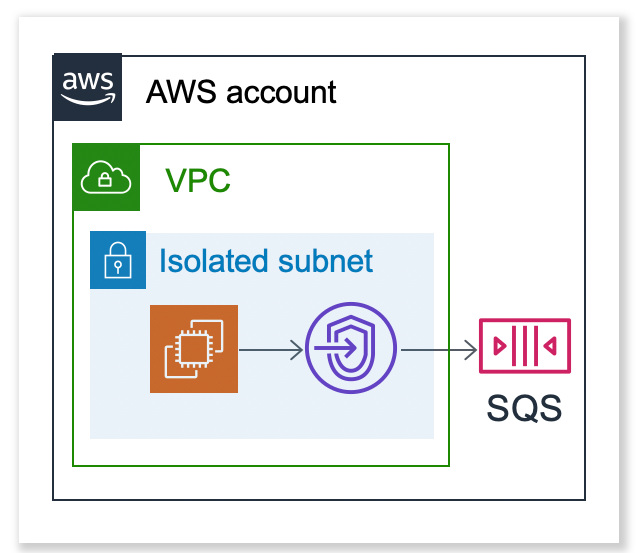
To set up EC2, we can use a custom AMI, a starting script, or another way. The output to SQS will go through a VPC endpoint, specifically an interface endpoint, also called as PrivateLink. There are more than 45 AWS services that enable VPC endpoints.
I’ve written a CDK application for deploying EC2 in an isolated network. Full administrator credentials are required to deploy it. It was designed as a basic attempt at an isolated network and hence has some flaws that an attacker who can run arbitrary code on the EC2 can use to exfiltrate data. It does not have weaknesses that could allow an attacker to obtain access.
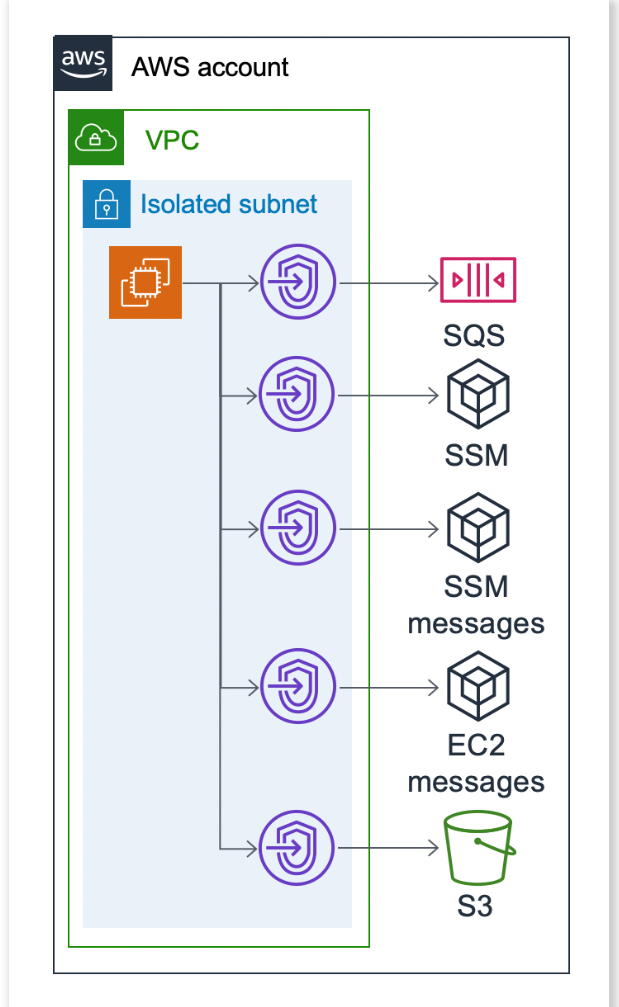
For testing, this CDK application is configured with an SSM session manager that allows us to access the instance via a terminal. By default, the Amazon Linux 2 AMI installs the SSM agent (code here), which invokes the SSM service and waits for a response for an extended period. To use the SSM session manager, the application creates new VPC endpoints for the SSM service, including ssm_messages and ec2_messages.
The Experimental Isolated Network also includes a gateway endpoint for S3, allowing us to examine what it looks like since S3 and DynamoDB are the only two services that use gateway endpoints rather than interface endpoints. This application should only cost $32 per month, but you can easily delete it after the experiment.
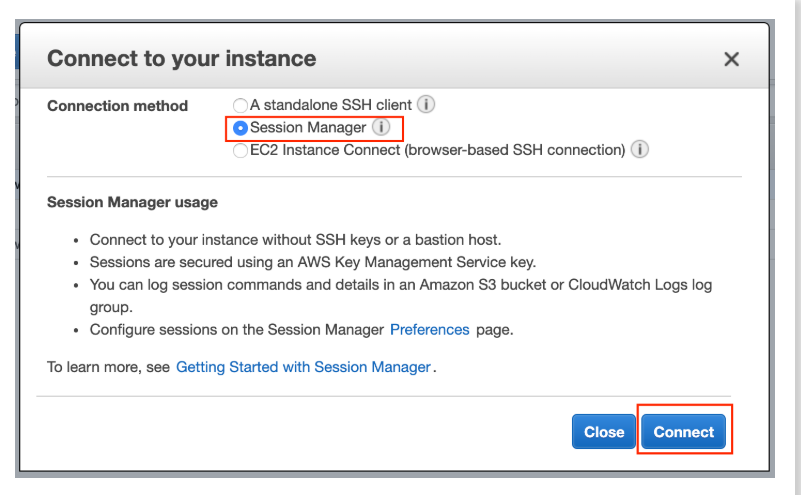
After deploying this CDK, locate EC2 in the EC2 console called IsolatedNetworkExperimentStack in the Network Console, pick the instance, and click Connect to access EC2 via a connection Manager terminal connection. Use your AWS account’s Administrator role for this experiment.
The browser should now display a terminal session.
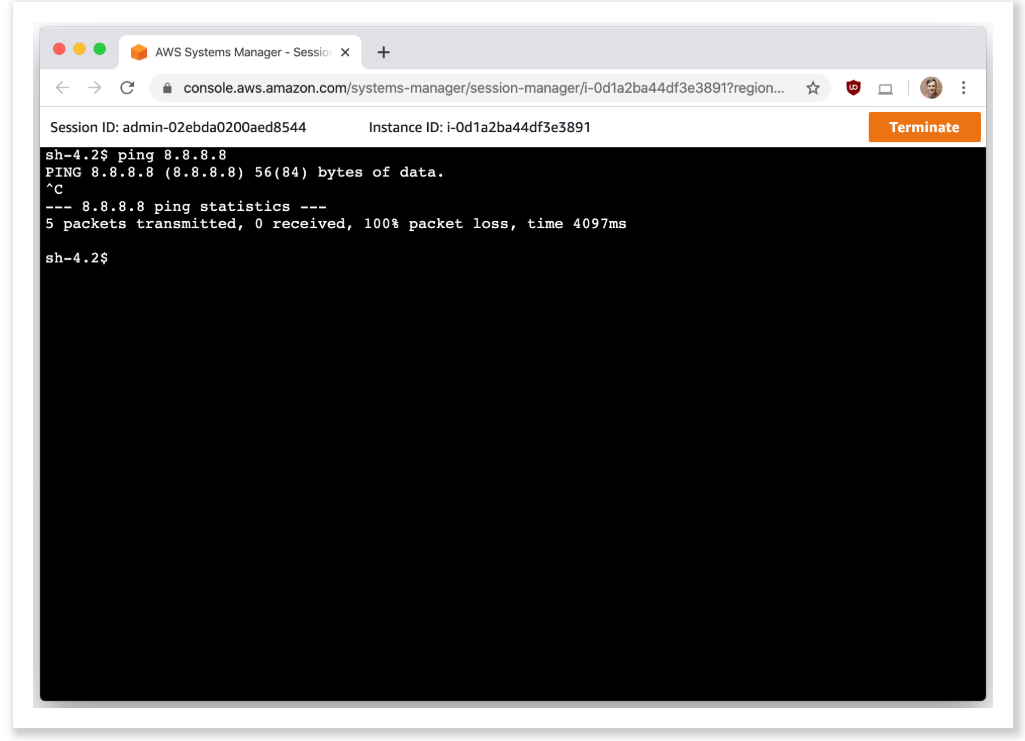
You can ping 8.8.8.8 to verify that the network is isolated, but you won’t get a response. When you attempt to ping a domain, like google.com, you will observe:
$ ping google.com
PING google.com (172.217.13.78) 56(84) bytes of data.
^C
--- google.com ping statistics ---
4 packets transmitted, 0 received, 100% packet loss, time 3060msAs you can see, it does discover the IP address for google.com, even though we’re still having 100% packet loss. This is because 169.254.169.253 is the default IP address of all of VPC’s DNS servers. Similar to the metadata service on 169.254.169.254, this magic IP address cannot be blocked using security groups or NACLs, its logs are not accessible, and VPC Flow Logs does not record connections to it.You don’t have access to these DNS logs, but GuardDuty does, and you can’t rely on it to identify (and most surely not stop) exfiltration.
An attacker with access to the EC2 might exfiltrate data by doing the following, to give a basic example of what I mean by DNS exfil or DNS tunneling:
To construct an SSH-type session using DNS, the attacker would then need to put up a DNS server for the attacker.com domain that could log in and maybe reply to these requests. They could even use something like https://github.com/yarrick/iodine.In his paper “Using DNS to Break Through Isolated Networks in AWS Cloud Environments,” Dejan Zelic delves more into this concept.
Mitigations
You must disable the AWS DNS service for the VPC to lessen this. The command modify-vpc-attribute is used in this, and it is covered in the AWS documentation. Naturally, EC2 loses DNS when it is disabled. You will no longer be able to utilize SSM Session Manager since EC2 will not recognize the VPC endpoint’s beacon position. You can set up your own DNS servers, or you can manually hard-code some values in EC2’s /etc/hosts file. To find the required IP and domain, run the following command from a CLI with administrator privileges (not EC2, as you do not have the necessary permissions or endpoint access)
An interface (for example, eni-0555bf66a28979277) and related DNS name (for example, ssm.us-east-1.amazonaws.com) will then be visible to you. Next, run this command to use interface names:
aws ec2 describe-network-interfaces --network-interface-ids eni-0555bf66a28979277Then add the following line to the /etc/hosts file:
You can restart the EC2 and disable DNS after you’ve filled in all of those VPC endpoints, but for the sake of simplicity, we’ll just leave DNS enabled and disregard this file path for the remainder of this lesson.
I haven’t tried it yet, but I’ve heard that using Route 53 Resolver is an additional alternative.
The CDK application establishes an SQS queue, and EC2’s IAM policy provides sqs:* on *. The request stops if we attempt to list the queue using aws –region us-east-1 sqs list-queues. Using –debug helps demonstrate that we are unable to access queue.amazonaws.com.
aws --region us-east-1 --endpoint-url https://sqs.us-east-1.amazonaws.com sqs list-queuesAdditionally, we can message this queue using:
aws --region us-east-1 --endpoint-url https://sqs.us-east-1.amazonaws.com sqs send-message --queue-url https://queue.amazonaws.com/000000000000/IsolatedNetworkExperimentStack-queue276F7297-1PHZ7GJS3L52F --message-body helloThe policy for our VPC endpoint is:
{
  "Statement": [
    {
      "Action": "*",
      "Effect": "Allow",
      "Principal": "*",
      "Resource": "*"
    }
  ]
}This means we can communicate with any SQS, including those in an attacker-controlled AWS account. We may have multiple apps in our isolated network that need to communicate with different SQS queues, so we do not want to overly restrict our endpoint policy. We could apply our IAM policy to the EC2 IAM role, but the attacker would simply carry their access key.
To limit which queues may be accessed via the VPC endpoint, we can adjust the endpoint policy for the VPC endpoint of SQS to
{
    "Statement": [
        {
            "Action": "sqs:*",
            "Effect": "Allow",
            "Resource": [
                "*:*:*:*:000000000000:*",
                "*:*:*:*:111111111111:*"
            ],
            "Principal": "*",
            "Condition": {
                "StringEquals": {
                    "aws:PrincipalOrgID": "o-0000000000"
                }
            }
        }
    ]
}This ensures that resources in the isolated network can only use the VPC endpoint for SQS if they attempt to connect with SQS queues managed by accounts we own (000000000000 and 111111111111) and only if the principal is from our organization (o-0000000000), preventing an attacker from using their access key.
Public Queues
An attacker can still create a publicly accessible SQS and then access that SQS through their attacker account. This can be done, for example, by creating a file with the contents of attributes.json:
{"Policy":"{\"Statement\": {\"Action\": \"sqs:*\",\"Effect\": \"Allow\",\"Resource\": \"*\",\"Principal\": \"*\"}}"}And then running:
aws --region us-east-1 --endpoint-url https://sqs.us-east-1.amazonaws.com sqs create-queue --queue-name test --attributes file://attributes.jsonTo find the SQS, the attacker must first know the account ID.
Timing attacks.
Even if you prevented queues from becoming public (which is not currently possible with IAM or other means), an attacker could still use timing attacks to create and delete a queue, and then attempt to send messages to it from another account, resulting in either an AccessDenied or AWS.SimpleQueueService.NonExistentQueue.
S3 and DynamoDB were the first services that could be accessed directly from a VPC using Gateway Endpoints, in contrast to the majority of services that require Interface Endpoints. The distinction is that gateway endpoints exist as route table entries, while interface endpoints exist as network interfaces. IP addresses are assigned to interface endpoints, and they might be associated with security groups. They too cost $7 per month and $0.01 per gigabyte. Gateway endpoints are free and have no Security Groups connected with them.
Run aws ec2 describe-route-tables. I notice the following in the response:
"Routes": [
    {
        "DestinationCidrBlock": "10.0.0.0/24",
        "GatewayId": "local",
        "Origin": "CreateRouteTable",
        "State": "active"
    },
    {
        "DestinationPrefixListId": "pl-63a5400a",
        "GatewayId": "vpce-029ddfccced52cd28",
        "Origin": "CreateRoute",
        "State": "active"
    }
]The first element indicates that 10.0.0.0/24 is routed locally, which is the subnet range. The next element is the S3 Gateway endpoint. I can validate this by executing aws ec2 describe-prefix-lists, as seen in the response:
{
    "Cidrs": [
        "54.231.0.0/17",
        "52.216.0.0/15",
        "3.5.16.0/21",
        "3.5.0.0/20"
    ],
    "PrefixListId": "pl-63a5400a",
    "PrefixListName": "com.amazonaws.us-east-1.s3"
},These IP addresses are related to S3 servers.
We can define a policy on the S3 Gateway endpoint in the same way that we do on the SQS Interface endpoint; however, because S3 buckets do not have account IDs in their ARNs, we must individually list each S3 bucket or utilize S3 Access Points.
To restrict access similarly to the SQS, you can utilize the following:
{
    "Version": "2012-10-17",
    "Statement": [
        {
            "Effect": "Allow",
            "Principal": "*",
            "Action": [
                "s3:ListBucket",
                "s3:GetObject"
            ],
            "Resource": "*",
            "Condition": {
                "StringEquals": {
                    "s3:AccessPointNetworkOrigin": "VPC",
                    "aws:PrincipalOrgID": "o-0000000000",
                    "s3:DataAccessPointAccount": ["000000000000", "111111111111"]
                }
            }
        }
    ]
}The CDK app contains an access point, which you can reach from the command line with:
6 RAFFLES QUAY
Singapore
+65 80951058
sign230203@gmail.com
©2024, hfengyun. AWS Discounted Billing | AWS Partner Network