Hfengyun is an official AWS service tier partner focused on providing customers with discounted AWS billing and a range of technical support.
©2024, hfengyun. AWS Discounted Billing | AWS Partner Network


AWS SSE-S3 is a decade-old AWS S3 server-side encryption solution that may be used to safeguard things uploaded to S3. It is a 256-bit AES encryption, commonly known as AES-256, which is one of the most powerful block ciphers available. The user has complete visibility into the encryption, key management, and decryption processes.
AWS S3 provides two types of encryption based on who manages the keys. Server-side encryption can be performed using either Amazon S3-managed keys (SSE-S3) or AWS Key Management Service (AWS KMS) keys (SSE-KMS).
SSE-KMS gives you additional control over the key. If you use SSE-KMS, you can select an AWS KMS customer management key or the default AWS management key (aws/s3 ).
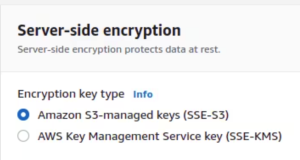
To determine whether an object in a certain bucket is encrypted, you must first know the bucket’s name and the object in question.
To verify encryption, use either the online console or the command line interface.
Using The Web Console
1.Log into the AWS interface and navigate to S3.
2. Under S3, open the bucket that contains the objects.

3. To access the Server Side Encryption Settings panel, click the object and scroll down. Encryption status is indicated here.
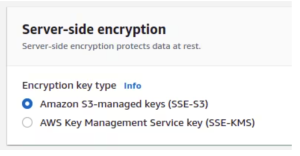
4. The panel will show either Off, Amazon S3 Managed Keys (SSE-S3), or the KMS key ARN used to encrypt the object.
1. Ensure that the appropriate AWS profile and credentials are used.
2. Enter the following command:
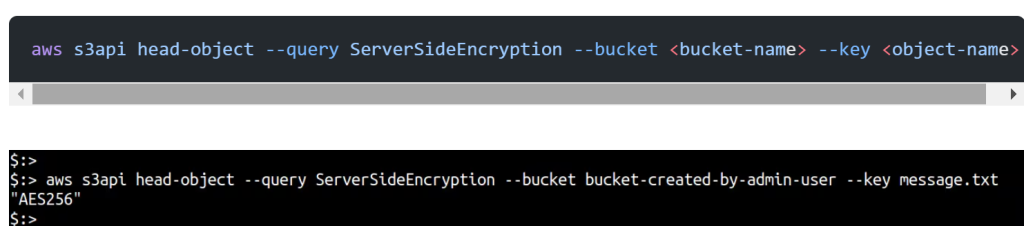
3. The output will be “null”, “AES256” or “aws: km”.
Earlier this month, AWS announced that Amazon Simple Storage Service (Amazon S3) will encrypt all new items by default. S3 automatically applies server-side encryption (SSE-S3) to all new objects unless a different encryption option is selected after upload.
Despite AWS’ assertions that this is a “zero-hit” design and that all new objects are encrypted by default, we saw the following.
Currently, AWS encrypts things added to buckets. This is evident in a CloudTrail data log, which records PutObject API calls to upload files or InitiateMultipart Upload for multiple-part uploads. The API call contains the key-value pair “SSEApplied”: “Default_SSE_S3”.
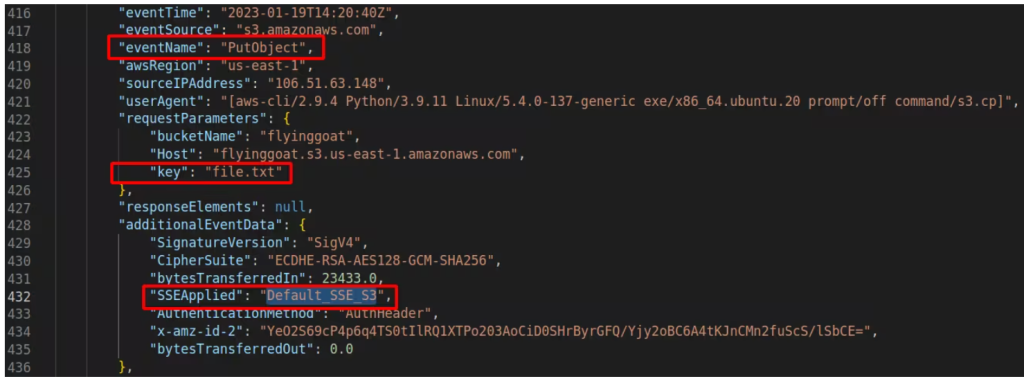
If encryption is not explicitly enabled, the web interface and API calls made via the CLI do not display the status. Whenever you upload a file to S3, you must enable encryption before the state of encryption changes to “Amazon S3-managed keys (SSE-S3)”. Otherwise, this is always displayed as “Off”.

Any tool or service that uses API calls to determine if an object is encrypted will simply mark it as unencrypted. This can lead to inaccurate results and false positives. Compliance tools and cloud security products, for example, may produce inaccurate results.
Detecting whether an object has server-side encryption enabled is impossible without accepting AWS’ word for it and depending on data events via Cloudtrail for S3.
We encourage server-side encryption to all of our customers, regardless of whether it is currently the default option. Enable server-side encryption and choose one of the two options provided. If there is no KMS, make sure to select “Amazon S3 Managed Key (SSE-S3)”.
Unfortunately, this procedure must be performed for each object to guarantee that the encryption settings are properly deployed throughout the storage bucket.
Bucket-wide encryption can be applied to any new objects added to the bucket using bucket settings.
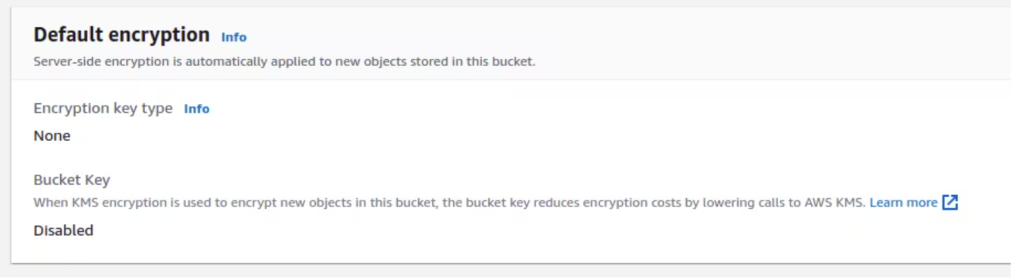
Until AWS improves its APIs to display the correct state of the object’s encryption if server-side encryption is enabled by default, we must ensure that encryption settings are applied correctly.
